Lab 018 : Appel de fonctions & utilisation d'outils
Ce que vous apprendrez
- Ce qu'est l'appel de fonctions (utilisation d'outils) et comment il fonctionne au niveau de l'API
- Comment définir des outils que le LLM peut appeler
- Comment analyser et exécuter les appels d'outils à partir de la réponse du modèle
- Comment implémenter une boucle d'exécution d'outils (la boucle d'agent)
- Modèles courants : outils parallèles, outils requis, gestion des erreurs d'outils
- La différence entre l'appel de fonctions et les plugins Semantic Kernel
Introduction
L'appel de fonctions (aussi appelé « utilisation d'outils ») est le mécanisme qui transforme un LLM d'un générateur de texte en un agent. Au lieu de simplement produire du texte, le modèle peut dire : « J'ai besoin d'appeler get_weather("Seattle") avant de pouvoir répondre. »
Votre code exécute ensuite cette fonction, retourne le résultat, et le modèle l'utilise pour générer une réponse fondée.
C'est le fondement de chaque agent IA :
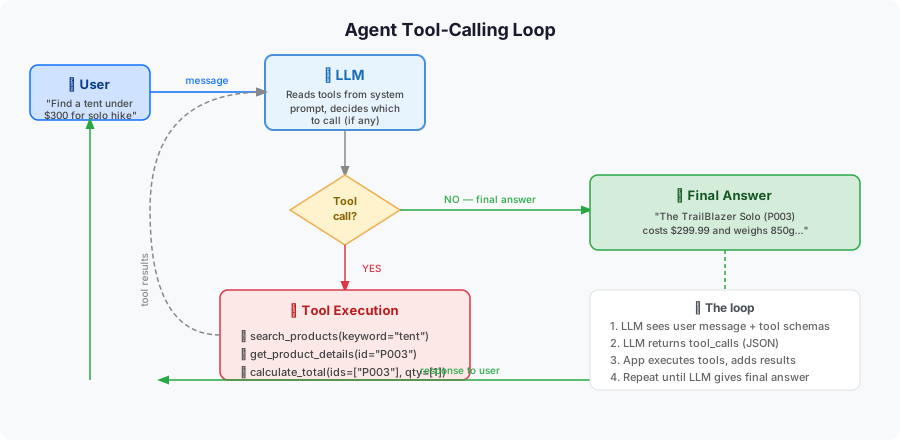
Comment fonctionne l'appel de fonctions
1. Vous définissez les outils sous forme de schémas JSON
tools = [
    {
        "type": "function",
        "function": {
            "name": "search_products",
            "description": "Search OutdoorGear products by criteria",
            "parameters": {
                "type": "object",
                "properties": {
                    "category": {
                        "type": "string",
                        "description": "Product category (e.g., 'tent', 'sleeping bag', 'backpack')"
                    },
                    "max_price": {
                        "type": "number",
                        "description": "Maximum price in USD"
                    },
                    "in_stock": {
                        "type": "boolean",
                        "description": "If true, only return in-stock items"
                    }
                },
                "required": ["category"]
            }
        }
    }
]
2. Le LLM répond avec un appel d'outil (pas du texte)
{
  "role": "assistant",
  "tool_calls": [
    {
      "id": "call_abc123",
      "type": "function",
      "function": {
        "name": "search_products",
        "arguments": "{\"category\": \"tent\", \"max_price\": 200}"
      }
    }
  ]
}
3. Vous exécutez la fonction et retournez le résultat
result = search_products(category="tent", max_price=200)
# Add result to messages as a "tool" role message
4. Le LLM génère la réponse finale en utilisant le résultat de l'outil
Étape 1 : Configuration
Étape 2 : Définir vos fonctions d'outils
import json
from typing import Optional

# Simulated OutdoorGear product database
PRODUCTS = [
    {"id": "P001", "name": "TrailBlazer Tent 2P", "category": "tent", "price": 189.99, "in_stock": True, "weight_kg": 1.8},
    {"id": "P002", "name": "Summit Dome 4P",      "category": "tent", "price": 349.99, "in_stock": True, "weight_kg": 3.2},
    {"id": "P003", "name": "UltraLight Solo",      "category": "tent", "price": 249.99, "in_stock": False, "weight_kg": 0.9},
    {"id": "P004", "name": "ArcticDown -20°C",     "category": "sleeping bag", "price": 299.99, "in_stock": True, "weight_kg": 1.5},
    {"id": "P005", "name": "ThreeSeasons 0°C",     "category": "sleeping bag", "price": 149.99, "in_stock": True, "weight_kg": 1.1},
    {"id": "P006", "name": "Osprey Atmos 65L",     "category": "backpack",     "price": 279.99, "in_stock": True, "weight_kg": 2.1},
    {"id": "P007", "name": "DayHiker 22L",          "category": "backpack",     "price": 89.99,  "in_stock": True, "weight_kg": 0.8},
]


def search_products(category: str, max_price: Optional[float] = None, in_stock: Optional[bool] = None) -> list:
    """Search products by category, price, and availability."""
    results = [p for p in PRODUCTS if category.lower() in p["category"].lower()]
    if max_price is not None:
        results = [p for p in results if p["price"] <= max_price]
    if in_stock is not None:
        results = [p for p in results if p["in_stock"] == in_stock]
    return results


def get_product_details(product_id: str) -> dict:
    """Get full details for a specific product by ID."""
    for product in PRODUCTS:
        if product["id"] == product_id:
            return product
    return {"error": f"Product {product_id} not found"}


def calculate_total(product_ids: list, discount_percent: float = 0) -> dict:
    """Calculate total price for a list of products with optional discount."""
    total = 0.0
    items = []
    for pid in product_ids:
        product = get_product_details(pid)
        if "error" not in product:
            items.append({"name": product["name"], "price": product["price"]})
            total += product["price"]
    discount = total * (discount_percent / 100)
    return {
        "items": items,
        "subtotal": round(total, 2),
        "discount": round(discount, 2),
        "total": round(total - discount, 2)
    }
Étape 3 : Définir les schémas d'outils
TOOLS = [
    {
        "type": "function",
        "function": {
            "name": "search_products",
            "description": "Search OutdoorGear products by category, price, and availability.",
            "parameters": {
                "type": "object",
                "properties": {
                    "category": {
                        "type": "string",
                        "description": "Product category: 'tent', 'sleeping bag', or 'backpack'"
                    },
                    "max_price": {
                        "type": "number",
                        "description": "Maximum price in USD. Omit if no price limit."
                    },
                    "in_stock": {
                        "type": "boolean",
                        "description": "Set to true to only return products currently in stock."
                    }
                },
                "required": ["category"]
            }
        }
    },
    {
        "type": "function",
        "function": {
            "name": "get_product_details",
            "description": "Get full details (price, weight, stock) for a specific product by its ID.",
            "parameters": {
                "type": "object",
                "properties": {
                    "product_id": {
                        "type": "string",
                        "description": "The product ID, e.g. 'P001'"
                    }
                },
                "required": ["product_id"]
            }
        }
    },
    {
        "type": "function",
        "function": {
            "name": "calculate_total",
            "description": "Calculate the total price for a list of products, with optional discount.",
            "parameters": {
                "type": "object",
                "properties": {
                    "product_ids": {
                        "type": "array",
                        "items": {"type": "string"},
                        "description": "List of product IDs to include in the total"
                    },
                    "discount_percent": {
                        "type": "number",
                        "description": "Discount percentage to apply (0-100). Default: 0"
                    }
                },
                "required": ["product_ids"]
            }
        }
    }
]
Étape 4 : La boucle d'exécution d'outils
C'est le cœur de chaque agent à appel de fonctions :
import os
import json
from openai import OpenAI

client = OpenAI(
    base_url="https://models.inference.ai.azure.com",
    api_key=os.environ["GITHUB_TOKEN"],
)

# Map function names to actual Python functions
TOOL_FUNCTIONS = {
    "search_products": search_products,
    "get_product_details": get_product_details,
    "calculate_total": calculate_total,
}


def run_agent(user_message: str) -> str:
    """Run the agent loop: chat → tool calls → results → final answer."""
    messages = [
        {
            "role": "system",
            "content": (
                "You are a helpful shopping assistant for OutdoorGear Inc. "
                "Use the provided tools to answer questions about products. "
                "Never invent product data — always use tool results."
            )
        },
        {"role": "user", "content": user_message}
    ]

    while True:
        # Call the LLM
        response = client.chat.completions.create(
            model="gpt-4o-mini",
            messages=messages,
            tools=TOOLS,
            tool_choice="auto",  # LLM decides whether to call a tool
        )

        message = response.choices[0].message
        messages.append(message)  # always append LLM's response to history

        # Check if the LLM wants to call a tool
        if response.choices[0].finish_reason == "tool_calls":
            # Execute each requested tool
            for tool_call in message.tool_calls:
                func_name = tool_call.function.name
                func_args = json.loads(tool_call.function.arguments)

                print(f"  🔧 Calling: {func_name}({func_args})")

                # Execute the function
                if func_name in TOOL_FUNCTIONS:
                    result = TOOL_FUNCTIONS[func_name](**func_args)
                else:
                    result = {"error": f"Unknown function: {func_name}"}

                # Add tool result to messages
                messages.append({
                    "role": "tool",
                    "tool_call_id": tool_call.id,
                    "content": json.dumps(result),
                })
        else:
            # No more tool calls — return the final answer
            return message.content


# Test it!
if __name__ == "__main__":
    questions = [
        "What tents do you have under $250 that are in stock?",
        "Show me the details for product P004 and calculate what it costs with a 10% discount.",
        "I need a lightweight tent and a sleeping bag for 0°C camping. What would be the total cost?",
    ]

    for q in questions:
        print(f"\n{'='*60}")
        print(f"User: {q}")
        print(f"{'='*60}")
        answer = run_agent(q)
        print(f"Agent: {answer}")
Étape 5 : Appels d'outils parallèles
Le LLM peut demander plusieurs appels d'outils dans une seule réponse. Traitez-les tous avant de retourner :
# The loop above already handles this — message.tool_calls is a list
# When LLM calls two tools at once, you'll see:
# 🔧 Calling: search_products({'category': 'tent'})
# 🔧 Calling: search_products({'category': 'sleeping bag'})
# (both in the same iteration)
Essayez de demander : « Comparez toutes les tentes et sacs de couchage à moins de 300 $ » — vous verrez deux appels d'outils parallèles.
Étape 6 : Contrôler le choix d'outil
# Auto (default): LLM decides whether and which tool to call
tool_choice="auto"

# Required: LLM MUST call at least one tool
tool_choice="required"

# Force a specific tool:
tool_choice={"type": "function", "function": {"name": "search_products"}}

# No tools (force text response):
tool_choice="none"
Étape 7 : 🧪 Défi interactif — Corriger la définition d'outil cassée
Le schéma ci-dessous comporte 3 bugs qui feront échouer l'outil ou le feront mal fonctionner. Trouvez-les et corrigez-les :
# BROKEN — find the 3 bugs
broken_tool = {
    "type": "functions",                    # Bug 1: wrong type
    "function": {
        "name": "get_inventory",
        "description": "",                  # Bug 2: empty description
        "parameters": {
            "type": "object",
            "properties": {
                "warehouse_id": {
                    "type": "int",          # Bug 3: wrong JSON Schema type
                    "description": "Warehouse identifier"
                }
            }
            # Missing "required" key — also a bug (but not counted)
        }
    }
}
Afficher les corrections
Bug 1 : "type": "functions" → devrait être "type": "function" (singulier)
Bug 2 : Description vide — le LLM utilise les descriptions pour décider quand appeler un outil. Sans description, le LLM ne saura pas ce que fait l'outil et pourrait ne jamais l'appeler (ou l'appeler de manière inappropriée).
Bug 3 : "type": "int" → devrait être "type": "integer" — JSON Schema utilise integer, pas int.
Bug bonus : La clé required est manquante. Ajoutez "required": ["warehouse_id"] pour vous assurer que le LLM passe toujours un identifiant d'entrepôt.
Appel de fonctions vs. plugins Semantic Kernel
| Appel de fonctions direct | Plugin Semantic Kernel | |
|---|---|---|
| Niveau | API bas niveau | Abstraction haut niveau |
| Schéma | Vous écrivez le JSON manuellement | Inféré à partir des annotations de type Python |
| Langages | Tout client compatible OpenAI | Python, C#, Java |
| Flexibilité | Contrôle total | Moins de code répétitif |
| Quand l'utiliser | Apprentissage, contrôle personnalisé | Agents SK en production |
En pratique, les plugins SK génèrent automatiquement le schéma JSON à partir des signatures de vos fonctions Python et de leurs docstrings. Sous le capot, c'est le même appel d'API.
🧠 Vérification des connaissances
Q1 (Choix multiple) : Quand le LLM retourne finish_reason='tool_calls', que doit faire votre boucle d'agent ensuite ?
- A) Retourner la réponse partielle à l'utilisateur et attendre une confirmation
- B) Exécuter la ou les fonctions demandées, ajouter les résultats en tant que messages
role: tool, puis appeler le LLM à nouveau - C) Ignorer la réponse et réessayer avec un prompt différent
- D) Passer à un modèle différent qui prend en charge l'outil
✅ Révéler la réponse
Correct : B
finish_reason='tool_calls' signifie que le LLM a besoin de données externes avant de pouvoir répondre. Votre boucle doit : (1) lire response.choices[0].message.tool_calls, (2) appeler chaque fonction demandée avec les arguments fournis, (3) ajouter le message du LLM ET les résultats d'outil à l'historique avec role: tool, puis (4) appeler le LLM à nouveau. Répétez jusqu'à ce que finish_reason == 'stop'.
Q2 (Exécutez le lab) : En utilisant la fonction search_products définie à l'étape 2, combien de tentes sont actuellement en stock ?
Exécutez la recherche manuellement ou parcourez la liste de produits de l'étape 2. Comptez les tentes où in_stock == True.
✅ Révéler la réponse
2 tentes sont en stock : P001 (TrailBlazer Tent 2P, 189,99 $) et P002 (Summit Dome 4P, 349,99 $)
P003 (UltraLight Solo) est marqué "in_stock": False. Donc search_products("tent", in_stock=True) retourne exactement 2 éléments.
Q3 (Exécutez le lab) : Que retourne calculate_total(["P001", "P007"]) dans le champ total ? (Aucune remise appliquée)
Consultez les prix de P001 et P007 dans la liste PRODUCTS et additionnez-les.
✅ Révéler la réponse
279,98 $
P001 (TrailBlazer Tent 2P) = 189,99 $ + P007 (DayHiker 22L) = 89,99 $ = 279,98 $. La fonction n'applique aucune remise lorsque discount_percent=0, donc total == subtotal == 279.98.
Résumé
| Concept | Point clé |
|---|---|
| Schéma d'outil | Objet JSON avec name, description et parameters |
| finish_reason | "tool_calls" = le LLM veut appeler une fonction ; "stop" = réponse finale |
| Résultat d'outil | Ajouté en tant que message role: "tool" avec le tool_call_id correspondant |
| Boucle d'agent | Continuez d'appeler le LLM jusqu'à finish_reason == "stop" |
| Outils parallèles | Une réponse peut contenir plusieurs appels d'outils — traitez-les tous |
Prochaines étapes
- Abstraction de plus haut niveau : → Lab 014 — SK Hello Agent — SK gère la boucle automatiquement
- Construire un serveur MCP : → Lab 020 — Serveur MCP en Python — outils exposés via un protocole standard
- Streaming avec outils : → Lab 019 — Réponses en streaming