Lab 018: Function Calling & Tool Use
O que você vai aprender
- O que é function calling (uso de ferramentas) e como funciona no nível da API
- Como definir ferramentas que o LLM pode chamar
- Como interpretar e executar chamadas de ferramentas a partir da resposta do modelo
- Como implementar um loop de execução de ferramentas (o loop do agente)
- Padrões comuns: ferramentas paralelas, ferramentas obrigatórias, tratamento de erros de ferramentas
- A diferença entre function calling e plugins do Semantic Kernel
Introdução
Function calling (também chamado de "tool use") é o mecanismo que transforma um LLM de um gerador de texto em um agente. Em vez de apenas produzir texto, o modelo pode dizer: "Preciso chamar get_weather("Seattle") antes de poder responder."
Seu código então executa essa função, retorna o resultado, e o modelo o utiliza para gerar uma resposta fundamentada.
Esta é a base de todo agente de IA:
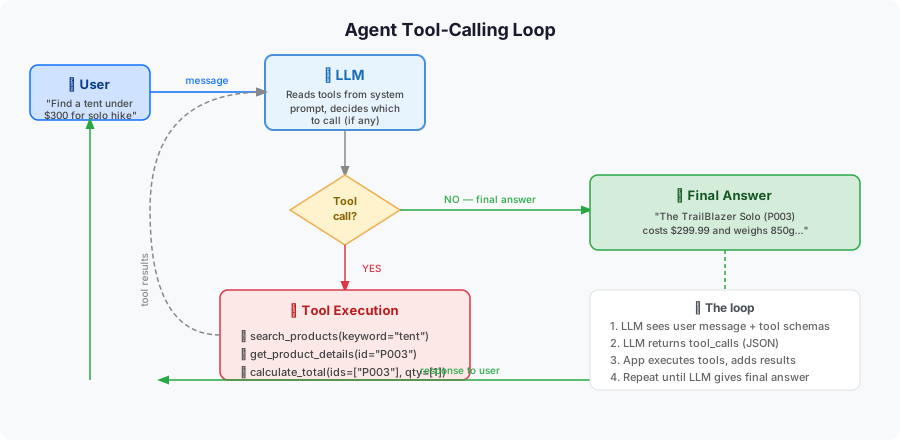
Como Function Calling Funciona
1. Você define ferramentas como esquemas JSON
tools = [
    {
        "type": "function",
        "function": {
            "name": "search_products",
            "description": "Search OutdoorGear products by criteria",
            "parameters": {
                "type": "object",
                "properties": {
                    "category": {
                        "type": "string",
                        "description": "Product category (e.g., 'tent', 'sleeping bag', 'backpack')"
                    },
                    "max_price": {
                        "type": "number",
                        "description": "Maximum price in USD"
                    },
                    "in_stock": {
                        "type": "boolean",
                        "description": "If true, only return in-stock items"
                    }
                },
                "required": ["category"]
            }
        }
    }
]
2. O LLM responde com uma chamada de ferramenta (não texto)
{
  "role": "assistant",
  "tool_calls": [
    {
      "id": "call_abc123",
      "type": "function",
      "function": {
        "name": "search_products",
        "arguments": "{\"category\": \"tent\", \"max_price\": 200}"
      }
    }
  ]
}
3. Você executa a função e retorna o resultado
result = search_products(category="tent", max_price=200)
# Add result to messages as a "tool" role message
4. O LLM gera a resposta final usando o resultado da ferramenta
Passo 1: Configuração
Passo 2: Defina suas Funções de Ferramenta
import json
from typing import Optional

# Simulated OutdoorGear product database
PRODUCTS = [
    {"id": "P001", "name": "TrailBlazer Tent 2P", "category": "tent", "price": 189.99, "in_stock": True, "weight_kg": 1.8},
    {"id": "P002", "name": "Summit Dome 4P",      "category": "tent", "price": 349.99, "in_stock": True, "weight_kg": 3.2},
    {"id": "P003", "name": "UltraLight Solo",      "category": "tent", "price": 249.99, "in_stock": False, "weight_kg": 0.9},
    {"id": "P004", "name": "ArcticDown -20°C",     "category": "sleeping bag", "price": 299.99, "in_stock": True, "weight_kg": 1.5},
    {"id": "P005", "name": "ThreeSeasons 0°C",     "category": "sleeping bag", "price": 149.99, "in_stock": True, "weight_kg": 1.1},
    {"id": "P006", "name": "Osprey Atmos 65L",     "category": "backpack",     "price": 279.99, "in_stock": True, "weight_kg": 2.1},
    {"id": "P007", "name": "DayHiker 22L",          "category": "backpack",     "price": 89.99,  "in_stock": True, "weight_kg": 0.8},
]


def search_products(category: str, max_price: Optional[float] = None, in_stock: Optional[bool] = None) -> list:
    """Search products by category, price, and availability."""
    results = [p for p in PRODUCTS if category.lower() in p["category"].lower()]
    if max_price is not None:
        results = [p for p in results if p["price"] <= max_price]
    if in_stock is not None:
        results = [p for p in results if p["in_stock"] == in_stock]
    return results


def get_product_details(product_id: str) -> dict:
    """Get full details for a specific product by ID."""
    for product in PRODUCTS:
        if product["id"] == product_id:
            return product
    return {"error": f"Product {product_id} not found"}


def calculate_total(product_ids: list, discount_percent: float = 0) -> dict:
    """Calculate total price for a list of products with optional discount."""
    total = 0.0
    items = []
    for pid in product_ids:
        product = get_product_details(pid)
        if "error" not in product:
            items.append({"name": product["name"], "price": product["price"]})
            total += product["price"]
    discount = total * (discount_percent / 100)
    return {
        "items": items,
        "subtotal": round(total, 2),
        "discount": round(discount, 2),
        "total": round(total - discount, 2)
    }
Passo 3: Defina os Esquemas de Ferramentas
TOOLS = [
    {
        "type": "function",
        "function": {
            "name": "search_products",
            "description": "Search OutdoorGear products by category, price, and availability.",
            "parameters": {
                "type": "object",
                "properties": {
                    "category": {
                        "type": "string",
                        "description": "Product category: 'tent', 'sleeping bag', or 'backpack'"
                    },
                    "max_price": {
                        "type": "number",
                        "description": "Maximum price in USD. Omit if no price limit."
                    },
                    "in_stock": {
                        "type": "boolean",
                        "description": "Set to true to only return products currently in stock."
                    }
                },
                "required": ["category"]
            }
        }
    },
    {
        "type": "function",
        "function": {
            "name": "get_product_details",
            "description": "Get full details (price, weight, stock) for a specific product by its ID.",
            "parameters": {
                "type": "object",
                "properties": {
                    "product_id": {
                        "type": "string",
                        "description": "The product ID, e.g. 'P001'"
                    }
                },
                "required": ["product_id"]
            }
        }
    },
    {
        "type": "function",
        "function": {
            "name": "calculate_total",
            "description": "Calculate the total price for a list of products, with optional discount.",
            "parameters": {
                "type": "object",
                "properties": {
                    "product_ids": {
                        "type": "array",
                        "items": {"type": "string"},
                        "description": "List of product IDs to include in the total"
                    },
                    "discount_percent": {
                        "type": "number",
                        "description": "Discount percentage to apply (0-100). Default: 0"
                    }
                },
                "required": ["product_ids"]
            }
        }
    }
]
Passo 4: O Loop de Execução de Ferramentas
Este é o núcleo de todo agente de function calling:
import os
import json
from openai import OpenAI

client = OpenAI(
    base_url="https://models.inference.ai.azure.com",
    api_key=os.environ["GITHUB_TOKEN"],
)

# Map function names to actual Python functions
TOOL_FUNCTIONS = {
    "search_products": search_products,
    "get_product_details": get_product_details,
    "calculate_total": calculate_total,
}


def run_agent(user_message: str) -> str:
    """Run the agent loop: chat → tool calls → results → final answer."""
    messages = [
        {
            "role": "system",
            "content": (
                "You are a helpful shopping assistant for OutdoorGear Inc. "
                "Use the provided tools to answer questions about products. "
                "Never invent product data — always use tool results."
            )
        },
        {"role": "user", "content": user_message}
    ]

    while True:
        # Call the LLM
        response = client.chat.completions.create(
            model="gpt-4o-mini",
            messages=messages,
            tools=TOOLS,
            tool_choice="auto",  # LLM decides whether to call a tool
        )

        message = response.choices[0].message
        messages.append(message)  # always append LLM's response to history

        # Check if the LLM wants to call a tool
        if response.choices[0].finish_reason == "tool_calls":
            # Execute each requested tool
            for tool_call in message.tool_calls:
                func_name = tool_call.function.name
                func_args = json.loads(tool_call.function.arguments)

                print(f"  🔧 Calling: {func_name}({func_args})")

                # Execute the function
                if func_name in TOOL_FUNCTIONS:
                    result = TOOL_FUNCTIONS[func_name](**func_args)
                else:
                    result = {"error": f"Unknown function: {func_name}"}

                # Add tool result to messages
                messages.append({
                    "role": "tool",
                    "tool_call_id": tool_call.id,
                    "content": json.dumps(result),
                })
        else:
            # No more tool calls — return the final answer
            return message.content


# Test it!
if __name__ == "__main__":
    questions = [
        "What tents do you have under $250 that are in stock?",
        "Show me the details for product P004 and calculate what it costs with a 10% discount.",
        "I need a lightweight tent and a sleeping bag for 0°C camping. What would be the total cost?",
    ]

    for q in questions:
        print(f"\n{'='*60}")
        print(f"User: {q}")
        print(f"{'='*60}")
        answer = run_agent(q)
        print(f"Agent: {answer}")
Passo 5: Chamadas de Ferramentas em Paralelo
O LLM pode solicitar múltiplas chamadas de ferramentas em uma única resposta. Trate todas antes de retornar:
# The loop above already handles this — message.tool_calls is a list
# When LLM calls two tools at once, you'll see:
# 🔧 Calling: search_products({'category': 'tent'})
# 🔧 Calling: search_products({'category': 'sleeping bag'})
# (both in the same iteration)
Tente perguntar: "Compare todas as barracas e sacos de dormir abaixo de $300" — você verá duas chamadas de ferramentas em paralelo.
Passo 6: Controlando a Escolha de Ferramentas
# Auto (default): LLM decides whether and which tool to call
tool_choice="auto"

# Required: LLM MUST call at least one tool
tool_choice="required"

# Force a specific tool:
tool_choice={"type": "function", "function": {"name": "search_products"}}

# No tools (force text response):
tool_choice="none"
Passo 7: 🧪 Desafio Interativo — Corrija a Definição de Ferramenta Quebrada
O esquema abaixo tem 3 bugs que farão a ferramenta falhar ou se comportar incorretamente. Encontre e corrija-os:
# BROKEN — find the 3 bugs
broken_tool = {
    "type": "functions",                    # Bug 1: wrong type
    "function": {
        "name": "get_inventory",
        "description": "",                  # Bug 2: empty description
        "parameters": {
            "type": "object",
            "properties": {
                "warehouse_id": {
                    "type": "int",          # Bug 3: wrong JSON Schema type
                    "description": "Warehouse identifier"
                }
            }
            # Missing "required" key — also a bug (but not counted)
        }
    }
}
Mostrar as correções
Bug 1: "type": "functions" → deve ser "type": "function" (singular)
Bug 2: Descrição vazia — o LLM usa as descrições para decidir quando chamar uma ferramenta. Sem ela, o LLM não saberá o que a ferramenta faz e pode nunca chamá-la (ou chamá-la de forma inadequada).
Bug 3: "type": "int" → deve ser "type": "integer" — JSON Schema usa integer, não int.
Bug bônus: A chave required está faltando. Adicione "required": ["warehouse_id"] para garantir que o LLM sempre passe um ID de depósito.
Function Calling vs. Plugins do Semantic Kernel
| Function Calling Direto | Plugin do Semantic Kernel | |
|---|---|---|
| Nível | API de baixo nível | Abstração de alto nível |
| Esquema | Você escreve JSON manualmente | Inferido a partir das type hints do Python |
| Linguagens | Qualquer cliente compatível com OpenAI | Python, C#, Java |
| Flexibilidade | Controle total | Menos código repetitivo |
| Quando usar | Aprendizado, controle personalizado | Agentes SK em produção |
Na prática, os plugins do SK geram o esquema JSON automaticamente a partir das assinaturas e docstrings das suas funções Python. Por baixo dos panos, é a mesma chamada de API.
🧠 Verificação de Conhecimento
P1 (Múltipla Escolha): Quando o LLM retorna finish_reason='tool_calls', o que o loop do seu agente deve fazer em seguida?
- A) Retornar a resposta parcial ao usuário e aguardar confirmação
- B) Executar a(s) função(ões) solicitada(s), adicionar os resultados como mensagens com
role: toole chamar o LLM novamente - C) Descartar a resposta e tentar novamente com um prompt diferente
- D) Trocar para um modelo diferente que suporte a ferramenta
✅ Revelar Resposta
Correta: B
finish_reason='tool_calls' significa que o LLM precisa de dados externos antes de poder responder. Seu loop deve: (1) ler response.choices[0].message.tool_calls, (2) chamar cada função solicitada com os argumentos fornecidos, (3) adicionar a mensagem do LLM E os resultados das ferramentas ao histórico com role: tool, e então (4) chamar o LLM novamente. Repita até finish_reason == 'stop'.
P2 (Execute o Lab): Usando a função search_products definida no Passo 2, quantas barracas estão atualmente em estoque?
Execute a busca manualmente ou percorra a lista de produtos no Passo 2. Conte as barracas onde in_stock == True.
✅ Revelar Resposta
2 barracas estão em estoque: P001 (TrailBlazer Tent 2P, $189,99) e P002 (Summit Dome 4P, $349,99)
P003 (UltraLight Solo) está marcada como "in_stock": False. Portanto, search_products("tent", in_stock=True) retorna exatamente 2 itens.
P3 (Execute o Lab): O que calculate_total(["P001", "P007"]) retorna no campo total? (Sem desconto aplicado)
Consulte os preços de P001 e P007 na lista PRODUCTS e some-os.
✅ Revelar Resposta
$279,98
P001 (TrailBlazer Tent 2P) = $189,99 + P007 (DayHiker 22L) = $89,99 = $279,98. A função não aplica desconto quando discount_percent=0, então total == subtotal == 279.98.
Resumo
| Conceito | Ponto-chave |
|---|---|
| Esquema de ferramenta | Objeto JSON com name, description e parameters |
| finish_reason | "tool_calls" = LLM quer chamar uma função; "stop" = resposta final |
| Resultado da ferramenta | Adicionado como mensagem com role: "tool" com tool_call_id correspondente |
| Loop do agente | Continue chamando o LLM até finish_reason == "stop" |
| Ferramentas paralelas | Uma resposta pode conter múltiplas chamadas de ferramentas — trate todas |
Próximos Passos
- Abstração de nível superior: → Lab 014 — SK Hello Agent — SK gerencia o loop automaticamente
- Construa um servidor MCP: → Lab 020 — MCP Server em Python — ferramentas expostas via protocolo padrão
- Streaming com ferramentas: → Lab 019 — Streaming Responses